This section explains the sharing settings for posts in the Biome app.
Overview
You can set two aspects of your post’s sharing settings: “Display Location” and “Post Visibility”.
By effectively utilizing the post visibility settings, you can enjoy communication with other users or simply keep your own private records.
Quick Q&A
Q: Will my posts be used for conservation, even if they are set to “Private”?
A: Yes. Regardless of the visibility setting, your posts will be utilized for conservation efforts in a way that prevents the identification of individuals. The information you register, even for “Private” posts, is utilized as fundamental data for species distribution, conservation, analysis, research, and other service maintenance purposes.
Q: I’m concerned that posting rare species might lead to over-collection.
A: Posts of rare species are automatically set to “Location Hidden”. Please refer to the table on this page to see how the post appears when the location is hidden.
Use Cases
🐤 For use with younger children (elementary school grades 1-3)
If a guardian is always present, setting both “Display Location” and “Post Visibility: Public” should be fine. However, if your child ever uses Biome alone, it might be best to set both to “Private” in the “Default Settings”.
😃 For use with older children (elementary school grades 4-6)
Older children often want to find, photograph, and post “Wildlife” themselves. It is recommended to set the “Default Settings” to “Location Hidden” and “Post Visibility: Private”. On the other hand, when posting a question or when they capture a spectacular photo, setting the “Post Visibility” to “Public” might make your child happy.
📒 For daily records near home
Recording the casual natural environment near you may hold significant meaning later on. When posting about your home area, setting the post to “Location Hidden” and “Post Visibility: Public” allows you to communicate with other users without displaying a map pin for your location.
🏕 For use at campgrounds or outdoors
If your home is not a campground or an outdoor facility, why not use “Display Location: Public” and “Post Visibility: Public”? You can let others know what “Wildlife” are there for their next visit or next year’s fun. It’s also enjoyable to compile your travel and outdoor memories into a collection!
🦋 If you want to share conservation or environmental information about your local area
For example, we sometimes hear people from rural areas say, “We only have nature in our hometown.” By sharing the richness of that nature with “Display Location: Public” and “Post Visibility: Public,” we hope to further improve the Biome app to contribute to conservation and nature tourism. Note that the location of rare species is automatically hidden.
❓ When posting a question because you don’t know the species name
If a post is “Private”, other users cannot see it and therefore cannot provide suggestions. Furthermore, knowing where the “Creature” was photographed makes it easier to offer suggestions. Therefore, we recommend “Display Location: Public” and “Post Visibility: Public” when posting questions. (You can change the visibility settings at any time.)
Setting Method
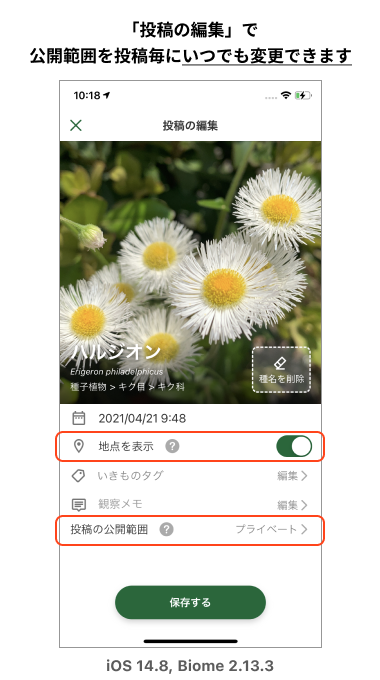
“Display Location” and “Post Visibility” can be set individually for each post.
* When creating a new post, you can set these options on the post confirmation screen.
* For already posted items, you can change the settings on the post editing screen.
About “Default Post Settings”
To avoid setting the visibility for every post, you can pre-specify the sharing settings in the app’s settings under “Default Post Settings”.
Setting the default post settings simplifies the operation, as the specified state is applied when creating a “New Post”.
Note that regardless of the default post settings, you can change the visibility settings for each individual post. The default post settings cannot change the visibility of past posts.
* The initial default setting immediately after installation is “Visibility: Private”.
* For iOS, the initial setting has been “Private” since v2.13.3.
If you were using the app with the “initial settings” before this update, the default post settings may have changed.
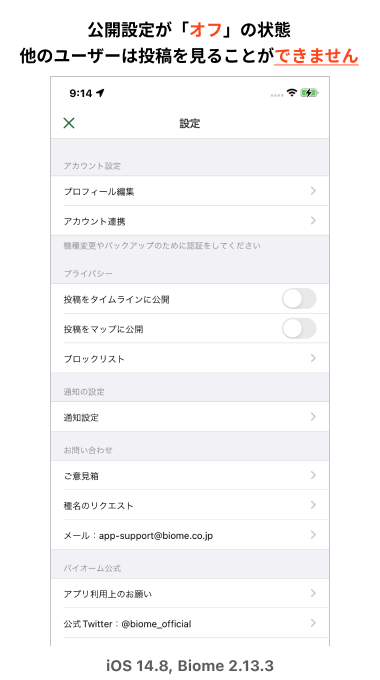
iOS Version Biome App Setup Procedure (iPhone, iPad, etc.)
1. Display My Page.
2. Tap the gear icon in the upper right.
3. You can set the privacy switch in the middle of the page.
The change is applied immediately after switching the toggle.

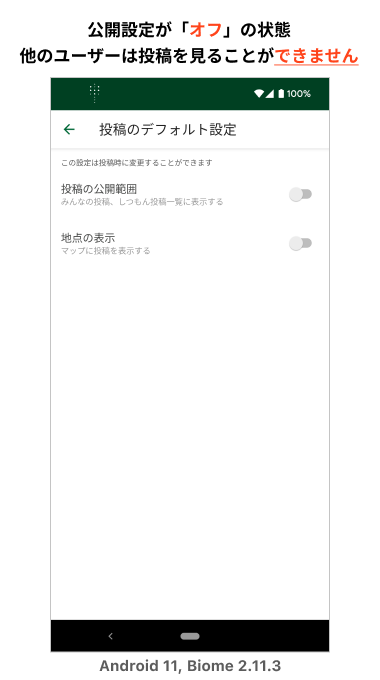
Android Version Biome App Setup Procedure
1. Tap the menu icon in the top left of the Home screen.
2. Tap “App Settings & Notifications”.
3. Tap “Default Post Settings”.
4. You can switch the settings using the toggle.
The change is applied immediately after switching the toggle.

Differences Based on Visibility Settings
The following reflects the specifications of the latest Biome app as of November 16, 2021.
| Setting Item | Case: Public (ON) | Case: Private (OFF) |
|---|---|---|
| Display Location Post to map Municipal display |
(1) Displays the “Municipality” in the post details Example: Nakagyo-ku, Kyoto City, Kyoto Prefecture (2) Displays as a pin on the map User names are not displayed on the map, and by not linking directly to the post details from the map, it is made difficult to identify who made the post. Also, rare species are automatically set to “Private”. |
The part of the post details where the municipality would normally be displayed will show the text “Location Hidden”. It is also not displayed on the map. |
| Post Visibility | Posts are displayed on the following screens: (1) Featured Posts, (2) Post lists such as New Arrivals, Favorites, and Questions, (3) Post list on My Page, (4) Post list in Collections, (5) “Everyone’s Posts” in the Encyclopedia, (6) Map pins and nearby “Wildlife”, (7) Search results and species identification, etc. Comments and suggestions must be set to “Public”. |
Visible only to yourself, and not displayed to other users. Also not displayed on the map or certain other screens. If the post is set to “Private”, you cannot receive comments or suggestions. It is also not visible to other users even if it is within a “Public” Collection. |
You can scroll the table horizontally to view all content.
Impact of Updates
For iOS, the initial setting changed to “Private” starting from v2.13.3.
* If you were using the app with the “initial settings” before the update, the default post settings may have changed.
* If you had previously changed the default post settings even once before the update, the settings will be carried over.
If you find that “you are not receiving suggestions even when posting a question,” please check if your post visibility is set to “Public”.